
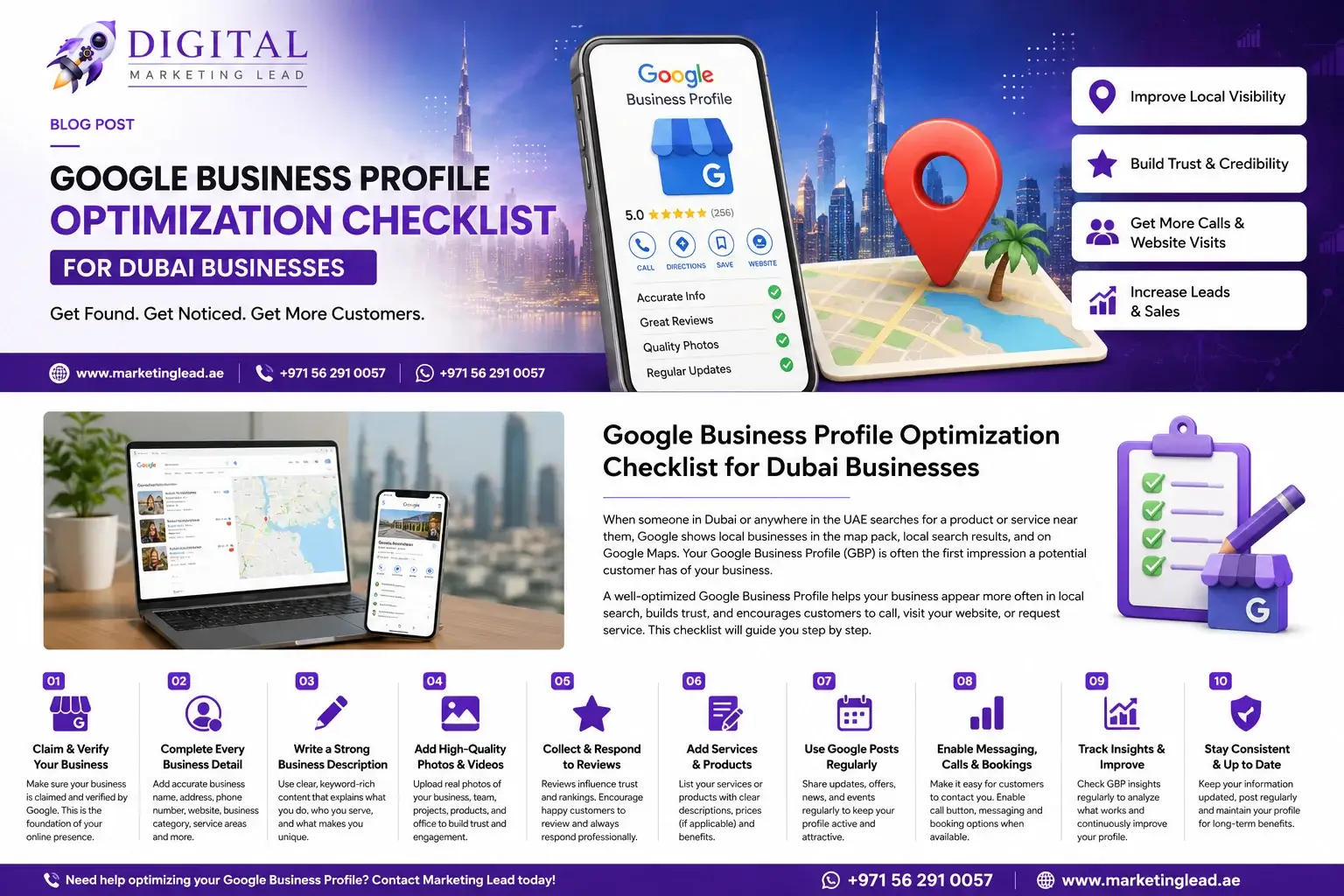
Google Business Profile Optimization Checklist for Dubai Businesses
When customers in Dubai need a restaurant, clinic, marketing agency, maintenance company, car rental provider, consultant or nearby service, many begin their search on Google.
Your Google Business Profile—formerly known as Google My Business—can display important information about your company across Google Search and Google Maps. Depending on your business type, this can include your address or service area, opening hours, phone number, website, photos, services and customer reviews.
However, simply creating a profile is not enough.
Your information must be accurate, your categories must reflect what you actually do, your photos must build trust, and your profile must give customers a clear way to contact you.
This Google Business Profile optimization checklist will help Dubai businesses improve their local visibility, attract more relevant customer actions and avoid common profile mistakes.
What Is Google Business Profile Optimization?
Google Business Profile optimization is the process of improving and maintaining your business information so customers and Google can clearly understand:
- What your business does
- Where your business is located
- Which areas you serve
- When you are open
- How customers can contact you
- Which products or services you provide
- Why customers should trust your business
A well-managed profile can help customers find accurate information and take actions such as calling your business, visiting your website, requesting directions or making a booking.
Google explains that local results are mainly influenced by relevance, distance and prominence. There is no method for a business to request or pay Google for a better organic local ranking.
This means successful Google Maps optimization requires more than adding keywords. Your profile, website, reputation and overall local presence must work together.
Why Google Business Profile Matters for Dubai Businesses
Dubai customers often compare several businesses before making contact. They may examine:
- Customer ratings and reviews
- Business location
- Service areas
- Opening hours
- Photos
- Website quality
- Service descriptions
- Phone and booking options
- Recent business updates
- Responses to customer feedback
An incomplete or outdated profile can create uncertainty. A complete and professionally maintained profile gives customers clearer information before they call, visit or submit an enquiry.
Google also advises businesses to keep profile information complete and accurate because inaccurate information may prevent a profile from appearing for relevant local searches.
Google Business Profile Optimization Checklist
1. Confirm That Your Business Is Eligible
Before creating a profile, make sure your business qualifies.
Google Business Profiles are generally intended for businesses that interact with customers face-to-face during their operating hours. This can include:
- Shops and retail locations
- Restaurants and cafés
- Clinics
- Salons
- Professional offices
- Service-area businesses
- Home-maintenance companies
- Car rental businesses
- Consultants who meet customers
- Marketing agencies with a customer-facing office
Online-only businesses are generally not eligible for a traditional Google Business Profile.
Do not create profiles for temporary locations, fake offices or addresses where your business does not genuinely operate.
2. Claim and Verify Your Profile
Your next step is to claim the correct business listing and complete Google’s verification process.
Verification confirms that you are authorized to manage the business. Once verified, you can update important information and manage how the profile appears to customers.
During setup:
- Use a Google Account controlled by your company.
- Search for your business before creating a new profile.
- Claim an existing profile when one already exists.
- Complete the available verification method.
- Add trusted owners or managers when necessary.
- Keep account-recovery information updated.
Avoid allowing a former employee, temporary freelancer or external agency to remain the only owner of your profile. Your company should always maintain primary control.
3. Use Your Real Business Name
Enter your business name exactly as it appears in the real world.
Your profile name should match your:
- Website
- Office or shop signage
- Trade materials
- Customer documents
- Social media branding
- Business stationery
Do not add unnecessary keywords, locations or promotional statements unless they are genuinely part of your official business name.
For example, avoid a profile name such as:
ABC Services – Best Affordable Carpenter, Kitchen Repair and Furniture Company Dubai
A more compliant name would simply be:
ABC Carpentry
Google advises businesses to represent themselves as they are consistently recognized in the real world. The guidelines also recommend using an accurate address or service area, selecting only the categories necessary to describe the business and generally maintaining one profile per business location.
Keyword stuffing may make a profile look unprofessional and can create policy problems.
4. Select the Correct Primary Category
Your primary category is one of the most important parts of your profile.
Choose the most accurate and specific category available for your core business activity.
For example:
- A dental clinic should select a dental-related primary category.
- A car rental company should choose a car-rental category.
- A digital marketing agency should select a marketing-related category.
- A carpenter should select a carpentry-related category.
- A business setup consultancy should select the category that most accurately reflects its main service.
Do not choose a category simply because it has a high search volume. The category must describe what your business actually does.
You can add relevant secondary categories when your company provides additional services, but avoid selecting every category that is loosely connected to your industry.
A focused category structure helps Google and customers understand the main purpose of your business.
5. Complete Every Important Business Detail
Fill in every profile field that applies to your business.
Important details include:
- Business name
- Primary category
- Secondary categories
- Address or service area
- Main phone number
- Website
- Opening hours
- Special hours
- Business description
- Services
- Products, where relevant
- Appointment or booking links
- Business attributes
Google’s Profile Strength feature can help identify missing information such as contact details, descriptions and opening hours.
Make sure the phone number is active and answered during the hours shown on your profile. Sending customers to a disconnected number or unanswered line can waste valuable enquiries.
6. Add Accurate Opening Hours
Your opening hours should reflect when customers can genuinely contact or visit your business.
Update your profile for:
- Normal working hours
- Friday schedules
- Weekend schedules
- Ramadan timings
- Eid holidays
- UAE public holidays
- Seasonal operating hours
- Temporary closures
Incorrect hours create frustration and can damage customer trust.
For example, if your profile says your office is open until 8:00 p.m., someone should be available to answer calls or assist customers until that time.
Do not show your business as open 24 hours unless you truly provide a 24-hour service.
7. Configure Your Address or Service Area Correctly
The correct setup depends on how your business operates.
Storefront Businesses
Display your address when customers can visit your location during the stated business hours.
Examples include:
- Restaurants
- Salons
- Clinics
- Shops
- Gyms
- Customer-facing offices
- Car rental branches
Make sure your map marker is positioned accurately so customers can find the entrance.
Service-Area Businesses
A service-area business travels to customers rather than serving them at its address.
Examples include:
- Carpenters
- Plumbers
- Electricians
- Cleaning companies
- Mobile repair providers
- Home-maintenance companies
Set realistic service areas based on the locations you genuinely cover. Do not add every emirate or Dubai neighbourhood when your team cannot serve those areas efficiently.
A carpenter based in Al Quoz may serve Business Bay, Downtown Dubai, Dubai Marina and nearby areas. That does not automatically mean the company should claim coverage across the entire UAE.
8. Write a Clear Business Description
Your description should explain your business naturally and professionally.
Include:
- What your company does
- Who you serve
- Your main services
- Your location
- Your service areas
- A clear business benefit
- A genuine point of difference
Avoid:
- Repeating the same keyword
- Writing in capital letters
- Making unsupported claims
- Adding unrelated services
- Copying content from competitors
- Filling the description with location names
Business Description Template
Marketing Lead provides [Digital Marketing Services] for [Dubai, UAE in [Business Bay, Marina, JLT, JBR]. Our team helps customers with Best Digital Marketing Services In Dubai through professional support, clear communication and reliable service. Contact us for
+971 56 291 0057.
Example for a Dubai Marketing Agency
Marketing Lead is a digital marketing agency based in Business Bay, Dubai. We help UAE businesses improve online visibility and generate qualified enquiries through SEO, Google Ads, social media marketing, lead generation, web development and conversion optimization. Our services are designed for local businesses, service companies and growing brands that need measurable digital growth.
This description explains the service clearly without unnecessary repetition.
9. Add Your Main Services
Do not rely only on your business category. Add your individual services to the profile where the feature is available.
A digital marketing agency may add:
- SEO services
- Local SEO
- Google Ads management
- Meta advertising
- Social media marketing
- Lead generation
- Website development
- Conversion rate optimization
- Online reputation management
A carpenter may add:
- Custom wardrobes
- Kitchen cabinets
- Furniture repair
- Office carpentry
- Wooden doors
- Interior woodwork
- Custom furniture
A clinic may add:
- General consultations
- Dental cleaning
- Teeth whitening
- Orthodontic consultations
- Emergency appointments
Use short, useful descriptions. Explain what each service includes and who it is suitable for.
The service wording should also match the information on your website.
10. Add High-Quality Photos and Videos
Photos help customers understand your business before they visit or contact you.
Google allows verified businesses to add photos and videos of their premises, products and services. Google specifically notes that an exterior image can help customers recognize a business when they arrive.
Useful photo types include:
- Business logo
- Cover image
- Exterior
- Reception area
- Office or store interior
- Team members
- Equipment
- Products
- Completed projects
- Service delivery
- Before-and-after results
- Customer-facing areas
Dubai businesses should use genuine images whenever possible. Real photographs of your office, team, vehicles, products or projects are usually more trustworthy than generic stock images.
Make sure images are:
- Clear
- Well lit
- Relevant
- Current
- Properly framed
- Consistent with your brand
Avoid uploading images with misleading information, excessive promotional text or content unrelated to the business.
11. Build an Ethical Customer Review System
Customer reviews are important for trust and local visibility.
Create a simple process for requesting feedback after a genuine customer experience.
You may share your Google review link or QR code through:
- Thank-you emails
- WhatsApp follow-up
- Receipts
- Invoices
- Customer-service messages
- Post-service follow-up
- Printed materials
Google provides businesses with the ability to create a review link or QR code. However, reviews must reflect genuine experiences, and businesses must not offer discounts, free products, payments or other incentives in exchange for reviews.
Do not:
- Buy reviews
- Ask employees to post customer reviews
- Offer gifts for five-star ratings
- Create fake customer accounts
- Ask only satisfied customers while blocking others
- Pressure customers to mention specific keywords
- Request that a negative review be removed in exchange for compensation
Google prohibits incentivized reviews and other forms of fake engagement. Profile restrictions may be applied when businesses violate these rules.
12. Respond to Positive and Negative Reviews
Responding to reviews shows that your business listens to customers.
Positive Review Response Example
Thank you for sharing your experience. We appreciate your feedback and are pleased that our team was able to assist you. We look forward to supporting you again.
Negative Review Response Example
Thank you for bringing this matter to our attention. We are sorry that your experience did not meet expectations. Please contact our team directly with your booking or service details so we can review the situation and work towards a suitable resolution.
Keep responses:
- Professional
- Calm
- Personal
- Brief
- Helpful
- Free from confidential customer information
Do not argue publicly, insult a reviewer or publish personal information.
A professional response can reassure future customers, even when the original review is negative.
13. Publish Google Business Profile Posts
Google Business Profile posts allow businesses to share announcements, offers, updates and event information with customers on Search and Maps.
Post ideas for Dubai businesses include:
- New service announcements
- Seasonal promotions
- Ramadan opening hours
- Eid schedules
- New branch openings
- Project photos
- Product launches
- Event registrations
- Consultation offers
- Limited-time packages
- Customer guides
- Business updates
Each post should have:
- One clear message
- A relevant image
- A concise headline
- A useful call to action
- A link to the correct service or landing page
Do not send every post to your homepage. Link users to the page that best matches the offer.
For example, a post about local SEO should link directly to your local SEO or Google Business Profile service page, SEO vs Google Ads in Dubai.
14. Add Website, Booking and Service Links
Your profile should give customers the shortest practical path to the next action.
Depending on your category and the features available for your profile, you may be able to add:
- Website links
- Appointment links
- Reservation links
- Service links
- Ordering links
- Pickup or delivery links
Google allows eligible businesses to add and manage local business links, including links for appointments, reservations and orders.
Send visitors to focused pages.
For example:
- Dental appointment button ? dental booking page
- Car rental link ? vehicle availability page
- Local SEO service ? Google Business Profile service page
- Restaurant order link ? online ordering page
- Consultation button ? consultation form
Avoid using a broken link or a general homepage when a more relevant page is available.
You can also add UTM tracking parameters to website links so visits from your Business Profile can be measured in your analytics system.
15. Make Calls and WhatsApp Enquiries Easy
Your phone number should be visible, accurate and actively monitored.
Many Dubai customers prefer to call or continue the conversation through WhatsApp. Your website landing page should therefore include:
- A click-to-call button
- A WhatsApp button
- A short enquiry form
- Opening hours
- Expected response time
- Clear service information
Google retired its older Business Profile chat experience, but eligible profiles may have access to text or WhatsApp contact options. Feature availability can vary, so businesses should maintain reliable phone and website contact paths even when direct messaging is available.
16. Connect Your Profile to a Strong Local Website
A Google Business Profile should not operate separately from your website.
Your website should support the same business information shown on the profile.
Important website elements include:
- Consistent business name
- Correct phone number
- Accurate address
- Service-area information
- Opening hours
- Individual service pages
- Dubai-focused content
- Contact page
- Embedded map where appropriate
- Customer reviews or testimonials
- Click-to-call and WhatsApp buttons
- LocalBusiness structured data
Google supports LocalBusiness structured data to help it understand details about a local company, such as its business type, location and opening information.
Do not create dozens of thin location pages that contain almost identical content. Each location page should provide useful and specific information.
For example, a high-quality Business Bay service page may include:
- Services offered in Business Bay
- Nearby areas covered
- Local customer problems
- Relevant project examples
- Contact information
- Directions or service process
- Area-specific FAQs
17. Keep Your Business Information Consistent Online
Your name, address and phone number should remain consistent across your website and important directories.
Review listings on:
- Bing
- Apple Maps
- Relevant UAE directories
- Industry directories
- Chamber or association profiles
- Social media platforms
- Review platforms
Common consistency problems include:
- Different phone numbers
- Old addresses
- Incorrect business names
- Duplicate profiles
- Outdated websites
- Different opening hours
- Closed branch listings
- Incorrect map locations
Citation cleanup means finding and correcting these conflicting listings.
Consistency helps customers identify the correct business and reduces confusion.
18. Monitor Profile Changes and Suggested Edits
Business information can sometimes be changed through user suggestions, third-party data or Google updates.
Check your profile regularly for:
- Changed opening hours
- Incorrect categories
- New photos
- Modified phone numbers
- Duplicate profiles
- Address changes
- Customer questions
- Review activity
- Website-link changes
Do not assume that a profile will remain correct after the initial setup.
Create a monthly review process so inaccurate information can be identified quickly.
19. Track Performance and Customer Actions
Google Business Profile performance data can show how customers find and interact with your business on Search and Maps. Available information can include profile views, clicks and other customer interactions.
Monitor:
- Profile views
- Website clicks
- Calls
- Direction requests
- Booking actions
- Search terms
- Review growth
- Photo performance
- Customer enquiries
- Qualified leads
- Closed customers
Do not measure success only by profile views.
A profile receiving fewer views but more qualified calls may be more valuable than one receiving high visibility with no genuine customer actions.
Connect profile data with your CRM or lead-tracking process whenever possible.
Dubai-Specific Google Business Profile Tips
Keep UAE Holiday Hours Updated
Review your hours before Ramadan, Eid and official UAE holidays. Customers should not arrive at a closed office because the profile shows normal timings.
Use Real Dubai Images
Use photographs that reflect your actual location, employees, vehicles, projects or customer environment. Real local images can build more trust than unrelated stock photography.
Match Your Service Areas to Your Capacity
Do not claim every Dubai location unless your team can realistically serve those areas.
A tightly managed service area can produce better customer experiences than accepting enquiries from places your team cannot cover.
Support Arabic- and English-Speaking Customers
Your website and customer communication should support the main languages used by your audience.
Do not create duplicate Business Profiles only to target another language. Use one accurate profile for the real business location and support multiple audiences through your website, customer service and content.
Prioritize Mobile Conversions
Customers viewing a Business Profile are often using a mobile phone.
Make sure your website:
- Loads quickly
- Displays correctly on mobile
- Has a visible call button
- Has a WhatsApp option
- Uses short forms
- Clearly explains the service
- Does not hide contact information
Common Google Business Profile Mistakes
Adding Keywords to the Business Name
Only use keywords when they are genuinely part of the business’s real name.
Creating Duplicate Profiles
Do not create separate profiles for every Dubai neighbourhood unless you operate legitimate, eligible locations in those areas.
Using a Fake Address
A virtual address, unstaffed location or fake office may create policy and verification problems.
Selecting Too Many Categories
Choose the fewest categories required to describe your real business.
Buying Customer Reviews
Fake and incentivized reviews violate Google’s policies and can damage customer trust.
Ignoring Negative Reviews
A professional response is usually better than silence or an emotional public argument.
Showing Incorrect Opening Hours
Customers may lose confidence when they call or visit during the advertised hours and receive no response.
Uploading Only Stock Photos
Customers want to see the actual business, team, location, products and completed work.
Linking Every Button to the Homepage
Send users to the most relevant service, booking or contact page.
Failing to Track Leads
Calls, website visits and enquiries should be measured so you know whether the profile is supporting business growth.
30-Day Google Business Profile Action Plan
Week 1: Profile Audit
Review:
- Ownership
- Verification
- Business name
- Address
- Service areas
- Phone number
- Website
- Opening hours
- Categories
- Duplicate listings
Week 2: Content Optimization
Improve:
- Business description
- Service listings
- Products
- Attributes
- Website links
- Booking links
- Logo
- Cover image
- Business photos
Week 3: Reputation and Website
Set up:
- A compliant review-request process
- Review-response templates
- Local service pages
- Clear phone and WhatsApp buttons
- Consistent contact information
- LocalBusiness structured data
Week 4: Publishing and Measurement
Begin:
- Regular profile posts
- Photo updates
- Performance monitoring
- Call and lead tracking
- Monthly profile checks
- Directory citation corrections
How to Measure Google Business Profile Success
A successful profile should contribute to real business outcomes.
Track these stages:
- Profile visibility
- Website visits
- Phone calls
- Direction requests
- Form submissions
- WhatsApp enquiries
- Bookings
- Qualified leads
- Sales
- Customer acquisition value
For example, a clinic may care most about appointment bookings. A carpenter may focus on calls and WhatsApp quotation requests. A restaurant may prioritize directions, reservations and orders.
Choose metrics that match the way your business generates revenue.
Improve Your Google Maps Visibility in Dubai
A Google Business Profile is not a one-time listing.
It requires accurate information, regular monitoring, genuine reviews, useful photos, professional responses, relevant website pages and clear customer contact options.
When these elements work together, your business can build a stronger local presence and make it easier for Dubai customers to understand, trust and contact you.
Marketing Lead provides local business listing and Google Maps optimization services for businesses in Dubai and across the UAE. Its services include Google Business Profile setup, category and service optimization, citation cleanup, review guidance, local SEO, performance tracking and customer-enquiry improvements.
Call or WhatsApp Marketing Lead at +971 56 291 0057 to request a free local listing audit.
Frequently Asked Questions
Is Google Business Profile free?
What is the difference between Google My Business and Google Business Profile?
How can my business rank higher on Google Maps in Dubai?
Can I add keywords to my Google Business Profile name?
Can a service-area business create a Google Business Profile?
Should I create separate profiles for every area in Dubai?
Do Google reviews help local visibility?
How often should I update my Business Profile?
Can I add WhatsApp to my Google Business Profile?
How can I track leads from Google Business Profile?
Need stronger rankings and qualified leads?
Get a Dubai-focused SEO and performance marketing plan for your business.
Get Free Consultation